

11th November 2022 4 MIN READ •Talos ATS •ATS Integrations

Reference checking can be one of the most time-intensive parts of the recruitment process, but its importance remains paramount to gauging the compatibility of new talent entering your business. Here we discuss how you can automate reference checking, saving time and effort for your HR team without compromising on candidate suitability…
What is ‘reference checking’ in recruitment?
There are two key types of reference checking in recruitment: personal references and professional references. Both provide valuable insight into a candidate’s performance, experience, and character prior to joining your business.
Professional references
Professional references are provided by colleagues, managers, and/or clients who have worked with a candidate in their previous employment. These are an important part of cross-checking the skills and qualities presented on candidates’ CVs and during interview stages.
Personal references
Personal references, or character references, are provided by key figures in a candidate’s personal life – such as teachers, lecturers, friends, and family members. They provide insight as to a candidate’s interpersonal skills, which are often just as – if not more valuable than their professional skillset.
How to automate reference checking in recruitment…
Automating reference checking has the potential to save hours of admin time for your recruitment team and hiring managers. Thanks to recruitment technology such as applicant tracking systems, this can be fairly straightforward to achieve…
1 – Decide which kind of reference you’d like to collect
The first step to automate reference checking is to decide what kind of references you’d like to collect. Many employers prioritise professional references when hiring new talent, as they provide an in-depth insight as to the skills and work ethic of potential recruits.
Consider the nature of the role, and how you wish to decipher candidates’ compatibility with your business. If you’re recruiting for collaborative, creative roles, personal references can be just as crucial for identifying candidates’ strengths and weaknesses in team-led environments.
For high-pressure, performance-led roles, professional references from managers and colleagues are an essential tool for gauging candidates’ over-arching compatibility.
The questions you ask at the referencing stage can play a huge part in your final hiring decision. Collaborate with colleagues and hiring managers to decide what kind of information you’d like to gather about a candidate’s character and skillset.
2 – Give candidates time to collate references
In order to get the best results from reference checking, you’ll need to give candidates time to reach out to the contacts they deem best for the job. This is usually done once candidates have been shortlisted, or provisionally selected for a role.
Let candidates know how many/which type of reference you’d like them to provide – make sure to get this in writing, and give a precise but reasonable deadline.
3 – Use a referencing portal to collect and collate information
Gone are the days of collecting candidate references by telephone, post, or email. With reference checking portals, you can simply send the candidate a shareable link to which they can submit the contact details of their referees.
Dean McGlone, Chief Revenue Officer at Talos360, explained: “With reference checking portals, you can simply send the candidate a shareable link where they can submit the contact details of their referees.
“This will automatically notify referees that they’ve been nominated to give a reference, allowing them to fill out an online form with any necessary information.”
4 – Track the status of reference completion through your ATS
It’s important to remember the human factor when collecting candidate references. Referees won’t always get back to you right away, and may even miss initial notifications that land in their inbox.
Luckily, ATS reference checking integrations allow you to track the progress of candidates’ references, and send follow-up notifications to their referees at the push of a button.
This means your hiring team will no longer need to manually chase up individual referees as a first resort, saving valuable time in recruitment admin.
You’ll be able to see which referee has completed, or is yet to complete their reference, without the need to contact them or your candidates directly.
5 – If you’re happy with their references, make a job offer!
Reference checking is far from a tick-box exercise; it’s a vital part of ensuring candidates’ compatibility with your business and the role in question.
Take time to consider candidates’ professional and personal references – do these give the impression of the type of colleague you’d like to hire/work alongside? If the answer is yes, then it’s time to make an informed hiring decision, and put together a formal job offer!
Be sure to consider both professional and personal references before making the final decision, and don’t be afraid to ask for more detail if necessary!
Introducing…
Talos ATS: Automated reference checking integration
Want to automate reference checking directly through your recruitment software? Talos ATS is the answer!
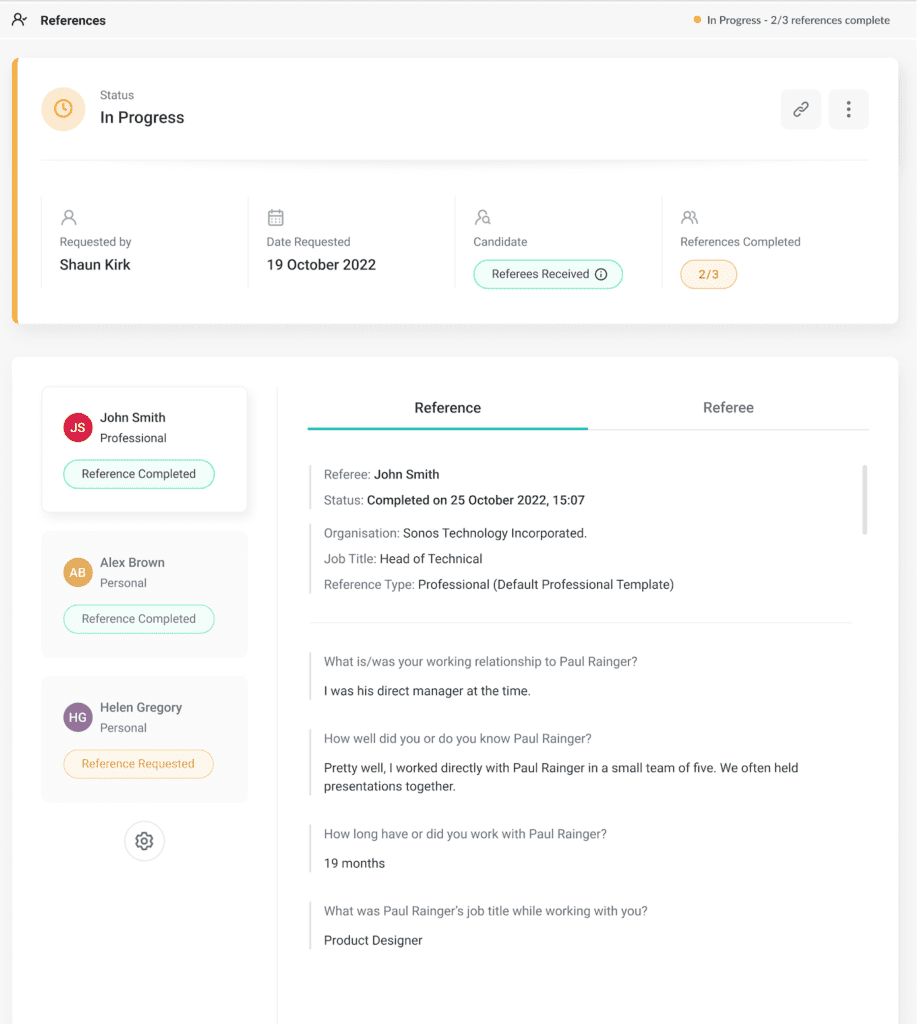
Our brand-new reference checking automation allows you to request and collate any number of references for any number of candidates – all without leaving your ATS platform!
This not only saves valuable time for your HR team, but also ensures hiring decisions are informed by qualitative data – promoting positive, compatibility-led hiring decision.
- Request any number of professional or personal references against a candidate
- Create bespoke professional and personal reference form templates within the ATS
- Receive automatic email notifications when a candidate and a referee has completed either form
- Know when a candidate or referee has, or hasn’t, viewed their form and send out manual reminders.
- Ability to manually add a referee or even a reference on behalf of the candidate or referee
- Timeline of events created against the referee
- Fully responsive candidate and referee online portals
- Interactive candidate portal allows the candidate to see when their referees have viewed and submitted their references
Discover an easier way to attract, hire, and onboard the best talent in your industry: